Module 4 of 6
Pack the bag smarter: single-GPU tricks
Your GPU memory is a backpack. When it overflows, you can buy a bigger bag (expensive), pack smarter (this module), or share the load (Module 5).
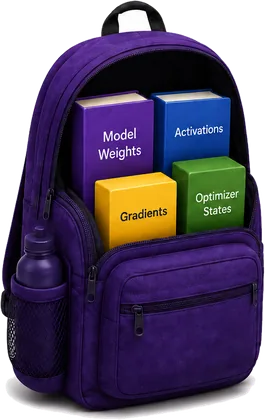
Quantization
Smaller items: paperbacks instead of hardcovers.
Mixed precision
Mix sizes: full folders only for important documents.
Gradient accumulation
Several smaller trips instead of one overloaded one.
Quantization: keep fewer digits

Why? To make a model smaller, so it needs less memory and answers faster. We already do this with π: 3.14159265 becomes 3.14. Quantization stores each number with fewer bits, at a small cost in accuracy.
How it works
Pick a small set of evenly spaced levels, then snap every number to the nearest one. The scale s sets the gap between levels. The zero-point z shifts the levels when the numbers aren't centred on zero.
To use a number, the GPU turns it back: x ≈ s × (q − z). The small gap left over is the quantization error. For int8 with z = 0, the scale is the largest |x| ÷ 127, so the biggest number lands exactly on 127.
Benefits and trade-offs
Benefits
- 4-bit weights need about a quarter of the memory of 16-bit ones.
- Faster text generation: each new token reads fewer bytes from memory (Module 6).
- Bigger models fit on smaller, cheaper GPUs.
Trade-offs
- Some quality loss: 8-bit is close to lossless, 4-bit usually loses a little, 3-bit and 2-bit lose a lot.
- Small models suffer more than big ones.
- Not always faster: it depends on the GPU, the software and the batch size.
- You can't train quantized weights directly. QLoRA freezes a 4-bit model and trains small 16-bit adapters instead.
In practice
Libraries: bitsandbytes with Hugging Face Transformers (load any model in 8 or 4 bits), Unsloth (fine-tune in 4 bits with QLoRA), torchao (PyTorch's own quantization), llm-compressor and GPTQModel (make GPTQ or AWQ checkpoints), and vLLM, TensorRT-LLM, llama.cpp and Ollama (serve quantized models).
Mixed precision: fast where we can, precise where we must
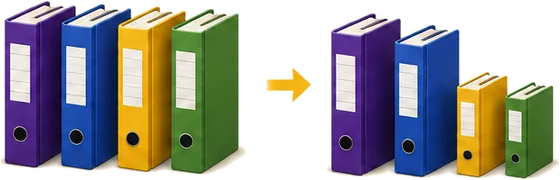
Why? Training in float32 is slow and memory-hungry. GPUs do 16-bit maths many times faster on their Tensor Cores, and 16-bit activations take half the memory. But a few steps really need float32's precision.
How it works
- Keep the weights in float32. This is the master copy.
- Run the forward and backward passes in mixed precision: matrix multiplications in bfloat16, and sensitive steps like softmax, normalization and the loss in float32. PyTorch's
autocastpicks for you. - The gradients arrive in float32, and the optimizer updates the float32 weights, so tiny updates aren't rounded away.
- With float16 only: multiply the loss by a big number before the backward pass, so tiny gradients don't round to zero, then divide them back before the update. This is loss scaling. bfloat16 has float32's range, so it doesn't need it.
Why must the update stay in float32? Try it:
Benefits and trade-offs
Benefits
- Faster maths: an H100 does about 990 TFLOPS in bfloat16, against 67 in float32. Real training often runs 2 to 3 times faster.
- Activations take half the memory, so bigger batches fit.
- Little or no loss in accuracy.
Trade-offs
- The model state doesn't shrink: weights, gradients and Adam still need about 16 bytes per parameter.
- bfloat16 needs an Ampere or newer GPU (A100, H100, RTX 30 series and up). On a T4, like free Colab, use float16.
- float16 overflows above 65,504 and loses tiny values, so it needs loss scaling.
In practice
Libraries: PyTorch AMP (torch.autocast and torch.amp.GradScaler), Hugging Face Trainer and Accelerate, PyTorch Lightning, Keras (mixed precision policies), and NVIDIA Transformer Engine for 8-bit (FP8) training on H100 and newer GPUs.
Gradient accumulation: several trips
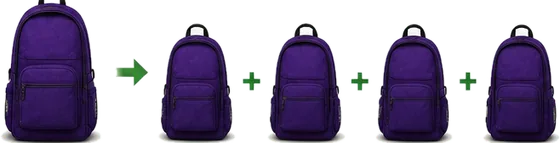
Why? Bigger batches give smoother, more stable training. But activation memory grows with the batch size, so the batch you want may not fit on your GPU.
How it works
- Split the batch you want into micro-batches that fit: a batch of 64 becomes 4 micro-batches of 16.
- Run the forward and backward pass on each micro-batch. PyTorch adds the gradients up in
.grad. Divide each loss by 4, so the sum becomes the average. - After the 4th micro-batch, update the weights once and reset the gradients to zero.
Benefits and trade-offs
Benefits
- Train with a big effective batch on a small GPU.
- The same gradient as the big batch, up to tiny rounding differences.
- One setting in most libraries.
Trade-offs
- Slower than a real big batch: the maths is the same, but small micro-batches keep the GPU less busy.
- Only activation memory shrinks. Weights, gradients and optimizer states stay the same size.
- Fewer updates per epoch, so tune the learning rate for the effective batch size.
In practice
Libraries: plain PyTorch (a few lines), Hugging Face Trainer (gradient_accumulation_steps) and Accelerate (accelerator.accumulate), PyTorch Lightning (accumulate_grad_batches) and DeepSpeed (gradient_accumulation_steps).
Comparing the three tricks
| Technique | What changes? | Main benefit | Main trade-off |
|---|---|---|---|
| Quantization | How numbers are stored | Less memory, faster inference | Some quality loss |
| Mixed precision | The precision of the maths | Faster training, less activation memory | Numerical care: loss scaling and the right GPU |
| Gradient accumulation | When the weights are updated | Big batches on a small GPU | Slower than a real big batch |

So there's no single best trick. Instead of asking "which optimization is best?", I should ask: what is my bottleneck, and what am I willing to trade to remove it?